
[Linux] New Product: ODROID-M1S
Introduction
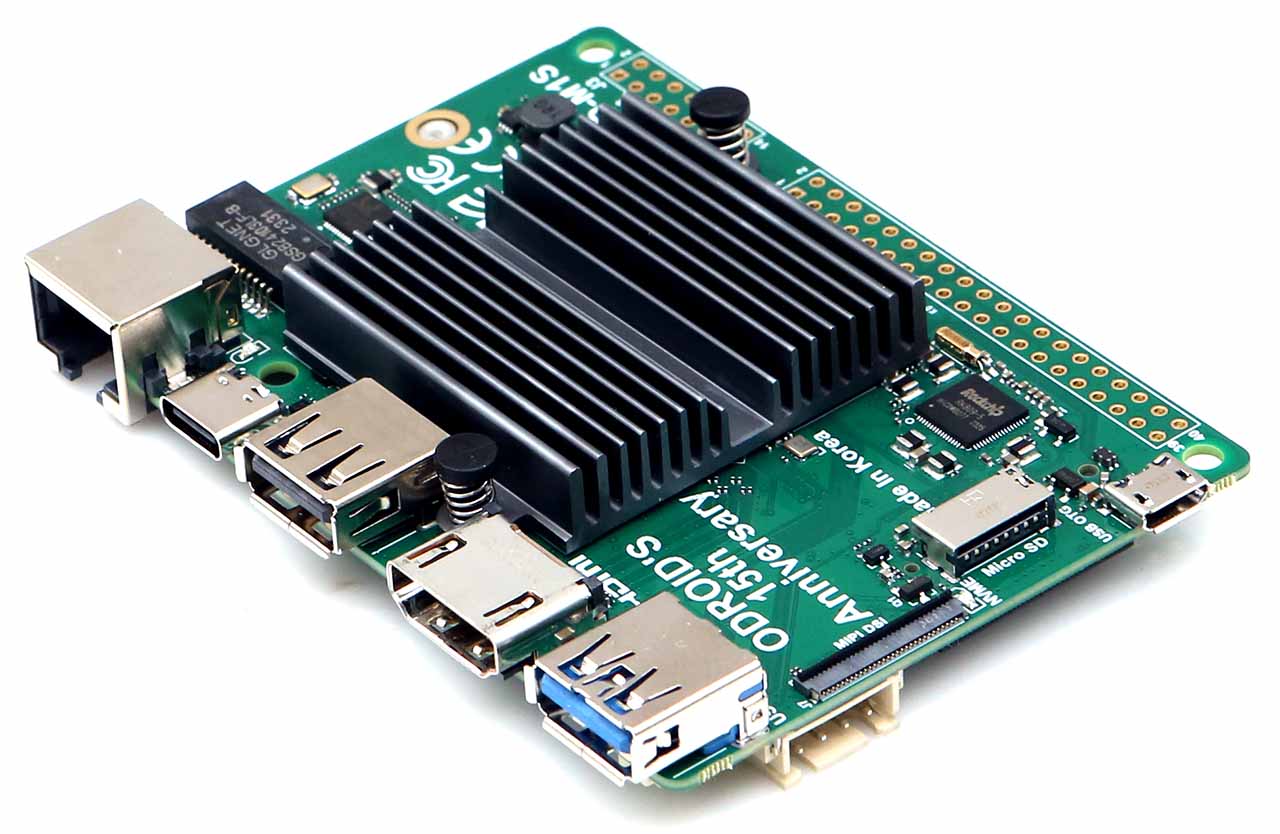
[ODROID-M1S]
Hardkernel’s new model, the ODROID-M1S, has been released.
It’s been two months since my last upload; I’ve been quite busy with M1S development.
OS
The following operating systems are supported by default:
Linux: Ubuntu 20.04 Server / Desktop
Android: Android 11
Custom Build
This guide covers how to custom build and install u-boot and the kernel for the new M1S model.
It is easier to follow along when referencing the official wiki.
u-boot
Perform these steps on a Linux PC. I used Ubuntu Desktop.
Install the cross-compiler and other necessary build packages. If compilation errors occur, use the toolchain from the official wiki.
$ sudo apt install lzop build-essential bc libncurses5-dev libc6-i386 lib32stdc++6 zlib1g:i386 gcc gcc-aarch64-linux-gnu
Download the u-boot source code.
$ git clone https://github.com/hardkernel/u-boot
$ cd u-boot
$ git submodule init
$ git submodule update
Build u-boot.
$ export ARCH=arm64
$ export CROSS_COMPILE=aarch64-linux-gnu-
$ ./make.sh odroid_rk3566
Upon completion, the following logs will appear.
Verify that the idblock.bin (SPL) and u-boot.bin (u-boot) files are generated.
...

********boot_merger ver 1.31********
Info:Pack loader ok.
pack loader okay! Input: /home/steve/u-boot/rkbin/RKBOOT/RK3568-ODROIDM1S.ini
/home/steve/u-boot

Image(no-signed, version=0): uboot.img (FIT with uboot, trust...) is ready
Image(no-signed): rk356x_spl_loader_v1.18.112.bin (with spl, ddr...) is ready
pack uboot.img okay! Input: /home/steve/u-boot/rkbin/RKTRUST/RK3568TRUST.ini

Platform RK3568 is build OK, with new .config(make odroid_rk3566_defconfig -j24)
/opt/toolchains/gcc-linaro-7.4.1-2019.02-x86_64_aarch64-linux-gnu/bin/aarch64-linux-gnu-
2023. 11. 17. (Fri) 09:28:47 KST
The address values for the SPL and u-boot files are specified in common/fb_mmc.c and configs/odroid_rk3566_defconfig, respectively.
$ git grep IDBLOCK_SECTOR | grep 64
common/fb_mmc.c:#define CONFIG_FASTBOOT_IDBLOCK_SECTOR 64

$ git grep U_BOOT_SECTOR | grep odroid_rk3566
configs/odroid_rk3566_defconfig:CONFIG_SYS_MMCSD_RAW_MODE_U_BOOT_SECTOR=0x0800
Overwrite the SPL and u-boot files onto the storage device.
$ sudo dd if=./idblock.bin of=<DEVICE/NODE/YOUR/STORAGE> conv=fsync seek=64
$ sudo dd if=./u-boot.bin of=<DEVICE/NODE/YOUR/STORAGE> conv=fsync seek=2048
Kernel
While the kernel can be built directly using the make command, I will use an existing package.
Install the kernel build script package.
$ sudo apt add-apt-repository ppa:how2flow/ppa
$ sudo apt update
$ sudo apt install kernel-scripts
Download the kernel source code.
$ git clone -b odroidm1-5.10.y --depth 1 https://github.com/hardkernel/linux
Build the kernel.
$ cd linux
$ echo "-odroid-arm64" > .scmversion
$ kernel-script --crosscompile

[kernel arch]
e.g 'arm64' or 'x86' or ...
Input arch: arm64

[kernel config]
e.g 'i386_defconfig' or 'oldconfig' or ...
Input config: odroidm1_defconfig

What do you want to build? (all/dtbs/modules)? [A/d/m]: A
Install the cross-compiled kernel files on the ODROID board.
You can use copy & paste or use an NFS mount.
# In odroid-m1s

$ cd linux
$ sudo sed -i "s/^force=.*$/force=\"yes\"/g" /usr/share/flash-kernel/functions
$ sudo ln -s $PWD/arch/arm64/boot/dts /usr/lib/linux-image-$(cat include/config/kernel.release)
$ sudo make modules install
$ sudo make install
Board Features
Some key features of the M1S include:
More I/O compared to previous ODROID models, on-board eMMC,
and lower power consumption while maintaining performance similar to the M1.

Leave a comment